How re-keying works
Follow folder and document keys through sharing, revocation, and moves.
A folder has a key-encryption key (KEK). A document has a data-encryption key (DEK) that encrypts its contents. Each folder the document is linked to has a wrapped copy of the DEK. A wrap encrypts one key for a particular recipient. An epoch identifies a generation of a key.
Sharing a folder
Suppose Alice shares a folder with Ben. Her client signs the new access manifest, which records who has access, and adds a wrap of the existing folder key for Ben. The folder keeps its key epoch. Its children, documents, and attachment bytes need no changes. Ben can use the current key to open the folder’s sealed keyring and recover keys for retained history.
Moving a folder
Suppose Alice moves Drafts from Team to Private within the same organization. Ben’s only access was through Team. Alice needs admin access to Drafts and write access to Private. Her client verifies both folder paths, generates a fresh 32-byte key for Drafts, and signs a move that binds Drafts to Private. A change of parent creates a new key epoch even when the same people can access both parents.
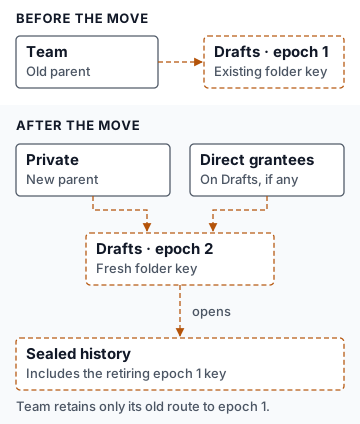
The client wraps the new Drafts key for Private and for the direct grants on Drafts. A direct grant to Ben on Drafts would therefore survive the move. In this example he had only inherited access, so Team’s key can still open the old Drafts key but gives him no route to the new one.
The move also seals the previous Drafts key under its successor (a predecessor bridge) and seals all earlier Drafts keys together under the new key (the keyring). Someone admitted through Private can read retained history. Ben can keep any old key, ciphertext, or plaintext he already had. Folder move implementation
Revoking access and writing below a changed folder
Removing a direct grant rotates the affected folder key. As with a move, the new key goes to the current parent, if any, and the remaining direct recipients. A person with a separate valid access path can still use it.
Suppose Ben loses his only grant to Team, and Drafts is an unshared child of Team. A retained writer can still read the old note in Drafts. Before accepting another edit, the protocol requires a current chain of keys all the way from Team to the note.
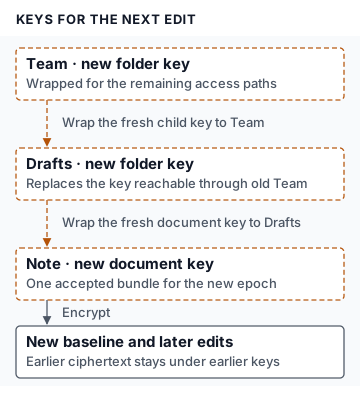
The client repairs stale folders parent-first. Some repairs must travel with the original rotation so that someone with a direct grant deeper in the tree can still write independently. Other branches, like unshared Drafts, can wait until the next write touches them. The API checks the signed changes and exact key targets. Clients generate keys and create the wraps. Descendant repair rules and limits
Document moves, attachments, and offline edits
- Linking a document to another folder adds a target. The same DEK can be wrapped for the expanded set of folders.
- Moving a document links it to the destination, then unlinks it from the source. Unlinking rotates the DEK. The client wraps the new key for the remaining folders and submits an encrypted snapshot of the document (the baseline) with the unlink. A document with no committed updates can skip the baseline. Later edits use the new DEK. Older updates keep their keys.
- An existing attachment has immutable encrypted bytes and a separate wrapped content key. Its wraps can change as its active bindings change. Changing the key that encrypted the bytes requires replacing or re-encrypting the attachment.
- A writer who was offline verifies current access on return. If another device already established the new baseline, the writer adopts the accepted key bundle and can re-emit pending edits from local document state. If a linked folder still needs repair by someone with access there, edits can wait. A writer who lost all write paths cannot submit new edits.
For the protocol details, see the container key hierarchy, document and blob keys, and document re-keying and audit history.