Authorship
See who contributed to a note and which parts of its current text came from each contributor. Authorship brings that context into Document Info, alongside the note's links, attachments, and security details.
Early access.While we test, hosted data can be reset, so keep a backup of anything important.
Read a note with its contributors in view
When several people work on a shared note, a single last-edited label leaves out much of the story. Authorship shows the contributors behind the document and highlights their contributions in the text you are reading.
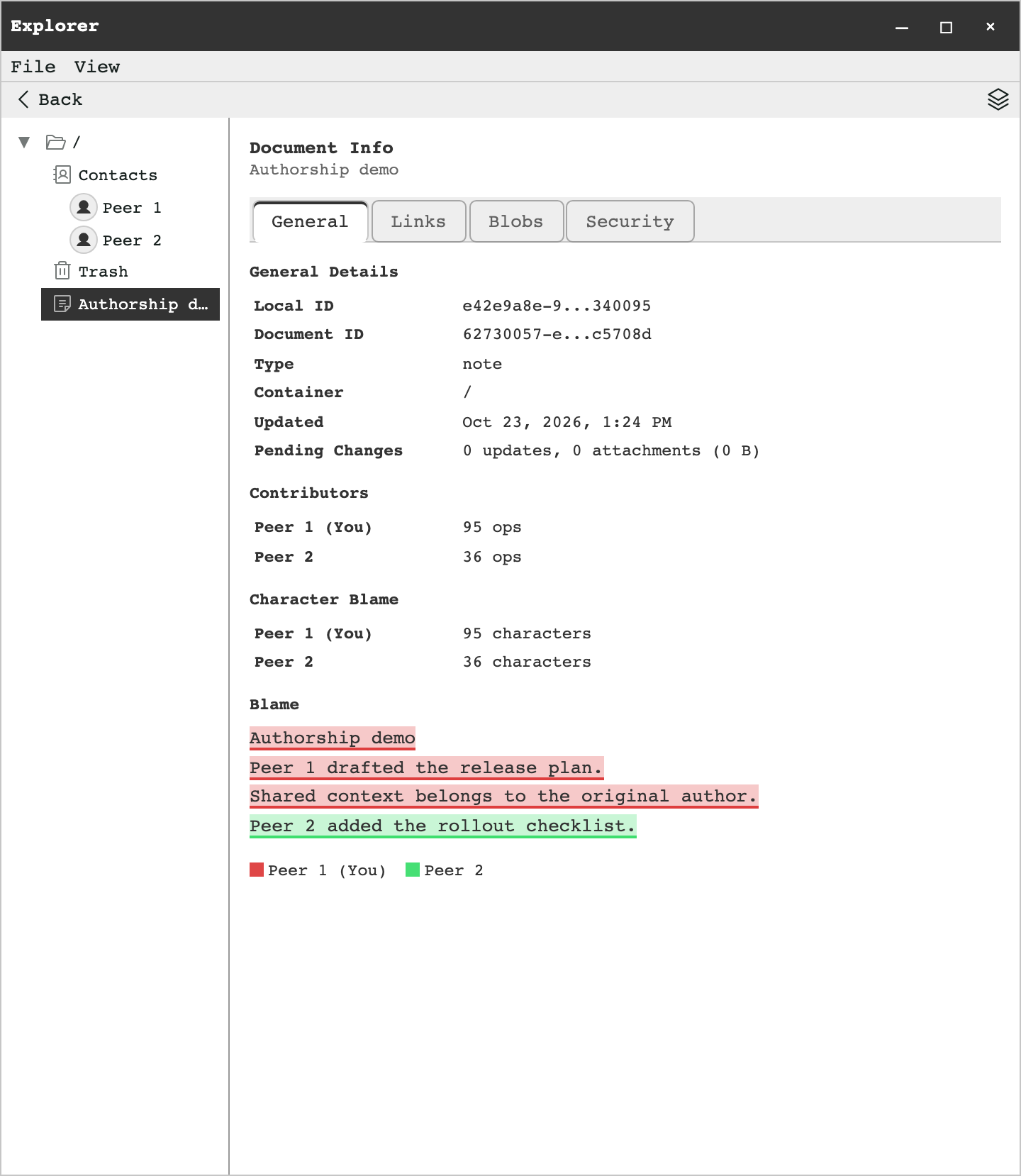
Three ways to understand a contribution
Document Info connects an overview of the edits with a closer look at the text that remains in the note.
- Contributors
- Lists contributing identities and their recorded edit operations, shown as “ops.” An operation count describes document changes; it is not a count of words, saves, or editing sessions.
- Character Blame
- Counts the characters in the current text attributed to each contributor. Deleted text no longer appears in these counts, so they answer a different question from the edit-operation totals.
- Blame
- Displays a read-only view of the note with colored text highlights and a contributor legend. Follow a color to see which passages share an author.
Find authorship in Explorer
Use a synced note with attribution available. A shared note makes it easy to see contributions from more than one identity.
Find the note
Open Explorer and locate the note you want to inspect.
Open Document Info
Open the note's Info view and select the General tab. The contributor summary appears alongside the document's general details.
Follow the text
Review Contributors, then Character Blame and the highlighted Blame view. Match the highlights to the legend to read each person's contribution in context.
How authorship works
Attribution follows document operations and signing identities, so contributions can be related back to the text after changes are merged.
Tearleads records edits as document operations. Synced updates carry a writer's user ID and signing-key fingerprint. Attribution records associate ranges of operations with that signing identity.
To build the authorship view, the app reads the current document on your device and matches each character's operation ID to those records. It totals the characters by contributor and groups adjacent characters from the same contributor into highlighted passages.
This view describes the current text. A person can have recorded edits even when none of their characters remain in the note. Names help you recognize contributors; the underlying attribution is tied to their signing identities.
When attribution is incomplete
The view distinguishes missing attribution from contributions it can identify.
- Unattributed text
- Local edits can appear before the attribution records catch up. Characters without matching records are marked Unattributed.
- Re-asserted contributions
- When attribution comes only from someone uploading an existing document state during key rotation, the contributor is marked “(re-asserted).” That identifies the signed uploader of that state; it does not establish who originally wrote its text.
- Unavailable summaries
- Document Info reports when edit attribution cannot be loaded or is too large for a complete summary. Character highlights may be absent when the local document cannot be read or is too large to scan. The rest of Document Info remains available.
Keep the context when you work together.